The Subject Module is a component of an educational management system that allows administrators and educators to create, manage, and organize subjects within an academic institution. This module enables users to define subject names, assign them to specific classes or sections, and link them to relevant syllabi or curriculum guidelines. It helps in maintaining a structured curriculum, ensuring that subjects are appropriately scheduled, and facilitating the allocation of teachers, resources, and assessments for each subject.
Create a Subject #
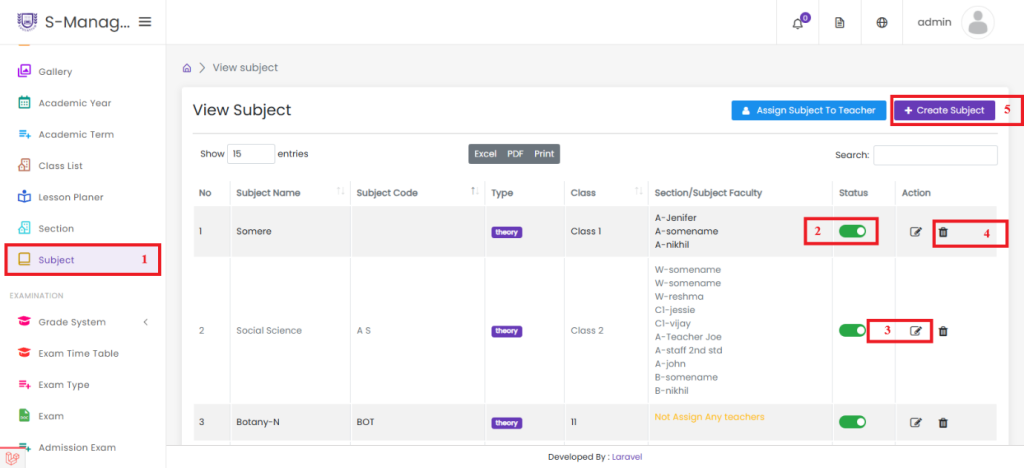
- Click on Subject
- Click to Enable or Disable the Created Subject
- Click Edit to Modify the Created Subject
- Click Delete to Remove the Created Subject
- Click to Create a New Subject
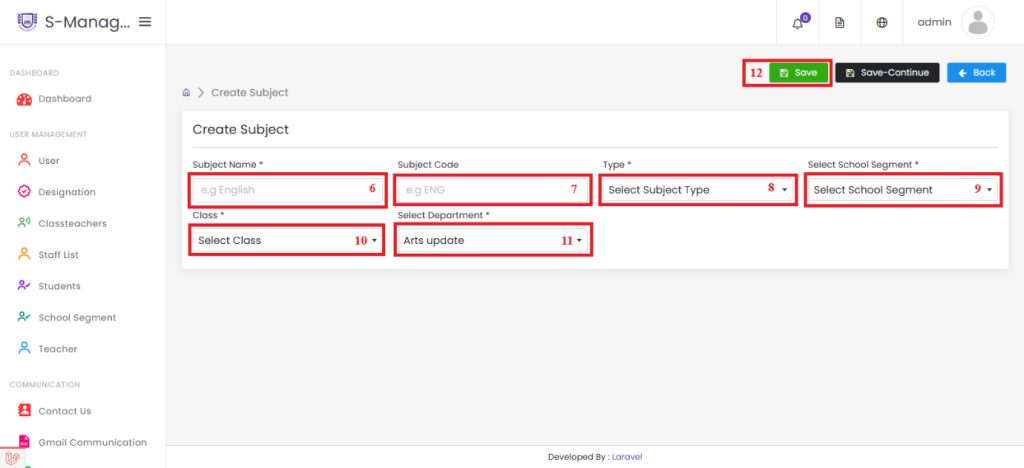
- Enter the Subject Name
- Enter the Subject Code
- Select the Type of Subject (Practical, Theory, or Both)
- Select the School Segment from the List
- Select the Class from the List
- Select the Department from the List
- Click Save to Successfully Create the Subject
Assign Subject to Teacher #

1.Click on Subject
2.Click to Assign Subject to Teacher

- Select the Class from the List
- Select the Section from the List
- Click the "Get Subjects" Button
- Click the Subject to Assign
- Select the Staff Name
- Click to Assign Teacher, and the Teacher Will Be Assigned Successfully


